The Look 1.1 eye tracking system provides hands-free, switch-free access to an Accent device, allowing the user to select keys by gazing for a specified period of time to generate speech. The Look 1.1 eye tracking system is compatible with the Accent 1000-30, Accent 1000-40, and Accent 1400 devices.
Look 1.1 Module Specifications
Classifications
Electrical shock protection: Class II / externally powered
Ingress protection rating: IP22
Mode of operation: Continuous
Type of applied part: BF
Specifications
Model: PRCL-1.1
Weight: 0.15 lbs
Dimensions: 7.50 in x 2.00 in X 1.20 in
Operating Environment (Device and Module)
Note: The device needs to be protected from moisture during use.
Ambient temperature: 0°C to 40°C (32°F to 104°F)
Relative humidity: 10% to 90%
Atmospheric pressure: 80 kPa to 106 kPa
Transport and Storage Environment (Device and Module)
While in transport or storage, the range of temperatures to which the device can be exposed is -20°C to 60°C (-4°F to 140°F), with an atmospheric pressure range of 80 kPa to 106 kPa.
Temperature Conditions for Direct Contact (Device)
Safe Contact Time Limit: Less than 1 minute
Safe Maximum Temperature: 50.0°C (122°F). While the device is in use, safe ambient temperature is 35°C (95°F).
⚠ While the device is charging, touching the surface of the device with broken skin may aggravate a wound.
⚠ While the device is charging, infants or high-risk groups should not touch the surface of the device if there is a chance of burning the skin.
If the Look eye tracking system was purchased at the same time as the Accent device, the module is already attached. Proceed to “Position the User and Eye Tracking System.”
If the Look eye tracking system was purchased separately from the Accent device, follow the instructions in this section to attach the module to the Accent 1000-40 device. You will need a Phillips screwdriver to complete this task.
Attach the Look 1.1 Module to Accent 1000-40
⚠
The mounts used should be fitted by a qualified person. Failure to install the mounting system according to the manufacturer's instructions may result in an injury to the user. Be certain that the user's view is not obstructed by the mounting.
Loose screws and adapters can be choking hazards.
Make sure the Accent device is fully charged.
Place the Accent device face-down on a table or counter so that the USB port is near the edge of the table or counter. This will make it easier to slide the Look module into place at the correct angle.
Insert the adapter into the USB port designed for the module on the back of the device. The port is centered and is near the bottom of the device.
Insert the module’s USB connector into the adapter.
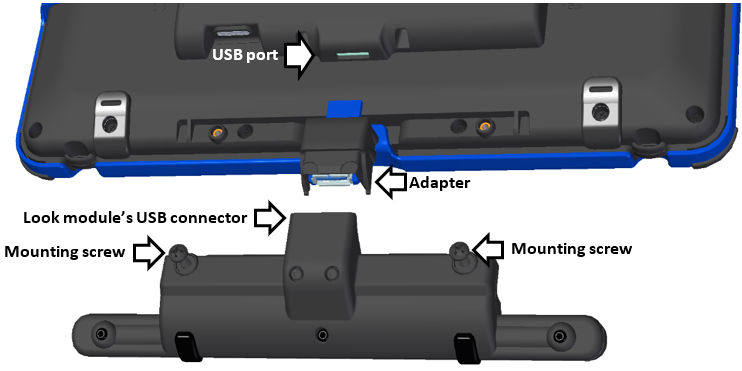
Hold the module firmly in place and align the screws in the bracket with the holes in the device.
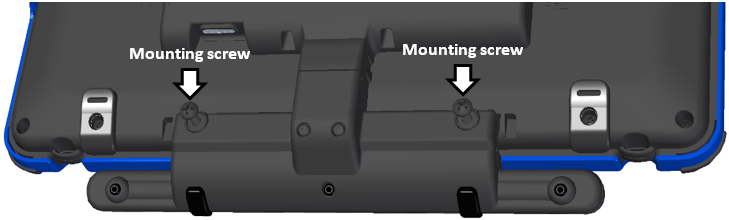
Tighten the screws evenly to make sure the module attaches flat against the device.
Place the Accent device on a wheelchair mount or a table stand.
Now you are ready to position the user, calibrate eye tracking in the software, and configure a selection method. Proceed to “Position the User and Eye Tracking System.”
Using a Pulse Oximeter with a Look Module
Pulse oximeters are sensitive to various ambient light wavelengths—specifically direct sunlight or infrared. Most pulse oximeter manufacturers recommend covering the pulse oximeter sensor with an opaque material to ensure desired results under all light conditions. Alternatively, you may be able to position the sensor below the Look module. However, covering the sensor is more robust against reflected IR and other ambient light interference.