⚠️ Excessive volume or sound pressure level when using earphones or headphones can cause hearing loss over extended periods of time.
The volume buttons are located on the edge of the device. Pressing one button increases the volume and pressing the other lowers the volume.
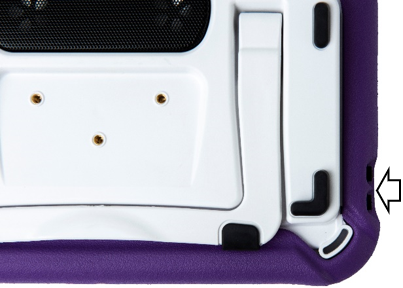
In addition to using the volume button, you can add volume controls to buttons within vocabulary pages.
An amplifier has been provided for additional volume. The amplifier is powered by its own battery and must be charged and turned on in order to provide sound.
The amplifier communicates with the device by means of a Bluetooth connection. If the two lose this connection, sound will be provided only by the device speakers and may not be sufficient for all environments.
To reconnect the amplifier to the device, make sure the amplifier is on and charged. Power off the device and then power it back on. The device will scan for the amplifier and reconnect to it.
Turning the Amplifier On/Off
Typically, the amplifier should be left on. During air travel and in some medical facilities the Bluetooth option is required to be turned off. When the amplifier is off, speech is still present but comes from the device’s internal speaker.
To turn the amplifier off: Press and hold the amplifier reset/power button (labeled “I/O”) until the amplifier LED goes out.
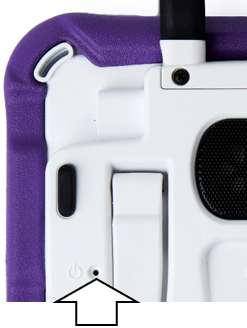
Note: The button is recessed. When you need to press it, use a pin.
To turn the amplifier on: Press the reset/power button for a second. The amplifier LED will flash to indicate the amplifier is on.
Turn Bluetooth Off (non-dedicated devices)
Open the device Settings.
Toggle OFF Bluetooth.
Turn Bluetooth On (non-dedicated devices)
Open the device Settings.
Toggle ON Bluetooth.
Choose the amplifier from the list of options under “Devices” to the right of “Bluetooth”.
Close the Settings.
The blue light on the edge of the amplifier should be solid blue.
Connect Bluetooth to the Software
Open the app that is installed on the device.
Open a vocabulary file and select Menu > Settings.
Scroll to the Amp Connect section.
Select Select Amp and choose your amplifier.