Front View
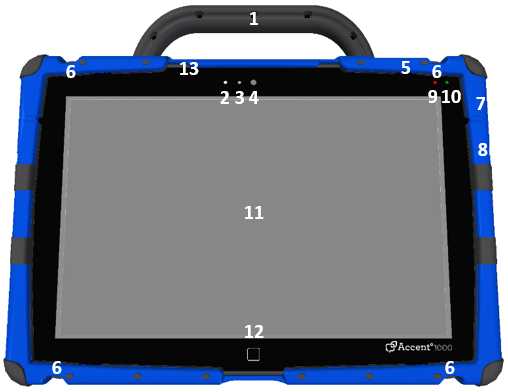
Handle
Light sensor
Camera indicator
Front camera
Power button
Carry strap holders
Volume button
Microphone
Battery/charging LED
Power LED
Display screen
Tools key
Microphone
Back View
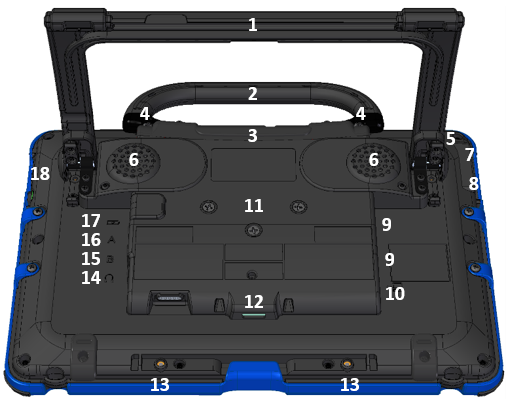
Stand (in open position)
Handle
Mini USB connector for NuPoint head tracking module
Attachment points for handle or NuPoint head tracking module
Rear camera1
Speakers
USB-C port
USB 3.0 port
USB 2.0 ports
External computer access mini port
QRM mounting plate location (plate optional)
USB 2.0 port for Look eye tracking module
Attachment points for Look eye tracking module
Headphone jack
Switch jack B2
Switch jack A2
Charging port
MicroSD card slot
1 The device ships with a thin transparent protective cover over the rear camera lens. To remove the cover, carefully slide a fingernail under the edge of the cover and peel the cover off the lens. Be careful not to scratch the lens.
2 If you use a switch or switches for access to your device, plug them into switch jacks A and B. To use a joystick, you will need a Y-adapter. If you have a joystick plugged in and it does not respond normally, reverse the way it is plugged in (plug switch A into jack B, switch B into jack A).
Left Side View
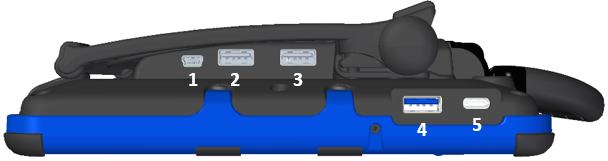
External access mini port
USB 2.0 port1
USB 2.0 port1
USB 3.0 port2
USB-C port
1 The USB 2.0 ports support USB 2.0 and USB 1.0 accessories.
2 The USB 3.0 port supports USB 3.0, USB 2.0, and USB 1.0 accessories.
Right Side View
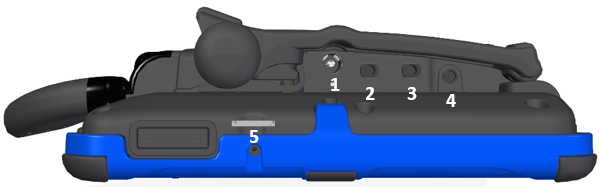
Charging port
Switch jack A *
Switch jack B *
Headphone jack
MicroSD card slot
*If you use a switch or switches for access to your device, plug them into switch jacks A and B. To use a joystick, you will need a Y-adapter. If you have a joystick plugged in and it does not respond normally, reverse the way it is plugged in (plug switch A into jack B, switch B into jack A).