Front View
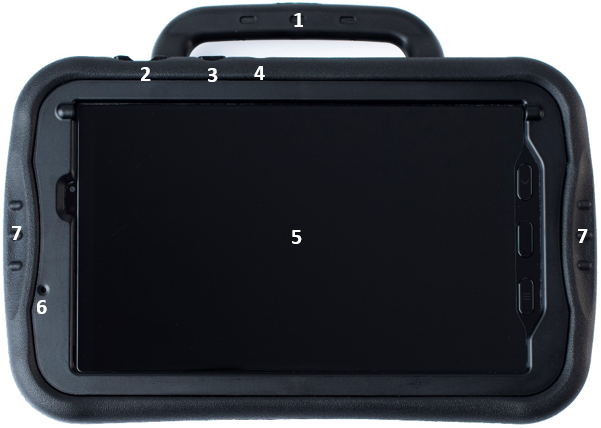
Handle
Volume button - Press the ends of the button to turn the volume up or down.
Side key - Press to wake the screen. Press and hold to display the power down option on the screen; then tap to confirm.
Active key - Press to open the Chat software when other apps are running. Press and hold to open another app.
Touchscreen/display
Front camera
Easy grip handles
Back View
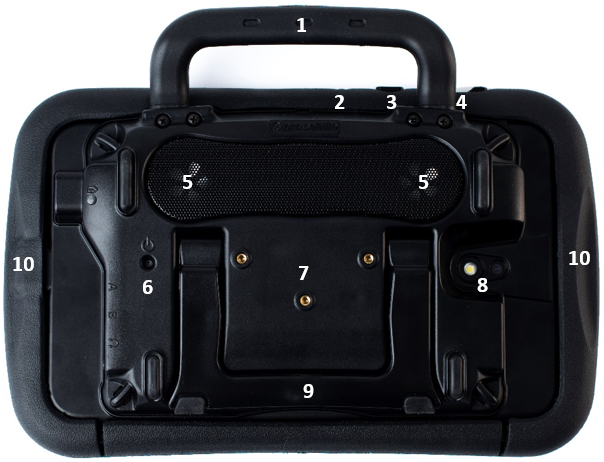
Handle
Active key
Side key
Volume button
Speakers
Amplifier power button
Wheelchair mounting plate screw holes
Rear camera
Stand
Easy grip handles
Side View
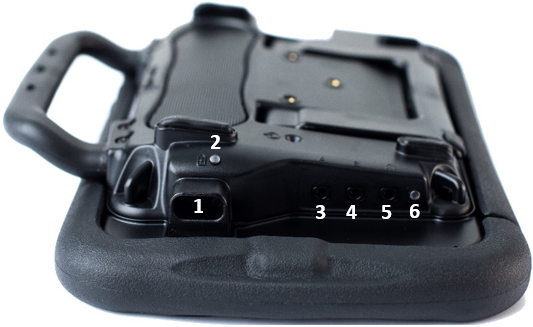
USB-C port for charging the device or transferring vocabulary
Charging LED
Switch jack A
Switch jack B
Headset jack
Bluetooth LED