Important: Infrared (IR) functionality is only available on non-dedicated (unlocked) devices.
The device emits infrared signals from the IR area on the back of the device. The optional IR reflector allows the user to better “aim” those signals from any position. The reflector kit includes the reflector, two short screws, and two long screws. The IR reflector can be mounted on the device handle, port cover, or NuPoint module, depending on which is already attached to the device. Follow these instructions to mount the IR reflector.
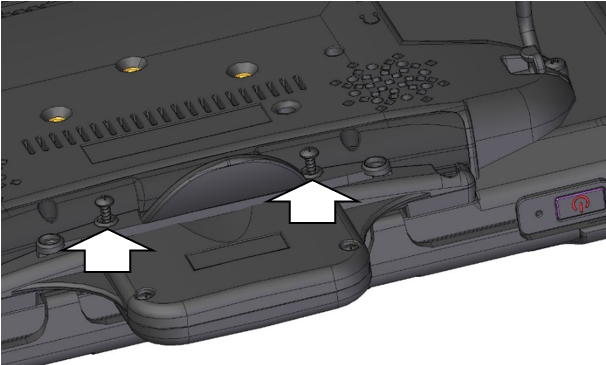
Using a Phillips screwdriver, remove the appropriate screws, as shown.
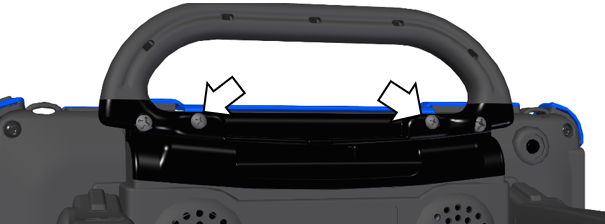
Handle: If the handle or port cover is attached to your device and the frame is attached with screws, remove the top frame screws.
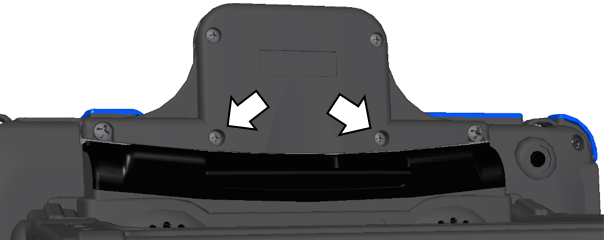
NuPoint Module: If a NuPoint module is attached to your device, remove the two inside screws from the module.
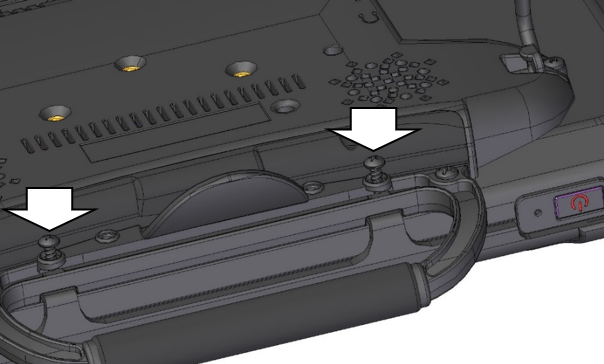
Align the holes in the reflector with the empty holes in the frame, port cover, or NuPoint module.
Important: Make sure the reflective shield is aimed downward toward the back of the device, as shown in step 3.
Insert the appropriate screws into the holes and tighten.
Handle or Port Cover
NuPoint Module