The device came with a frame mounted on it. If you need to remove or replace the frame, follow these instructions.
Remove the Frame
If you are using a keyguard or TouchGuide, remove it from the frame.
Using a Phillips screwdriver, remove the four screws that secure the frame to the device—two on the top and one on each side.
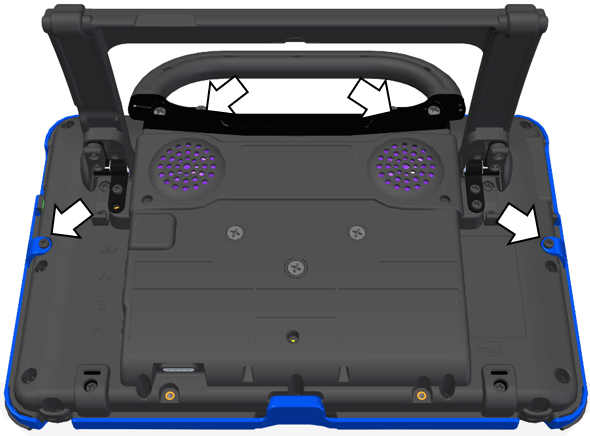
Important: If you are replacing the frame, set the screws aside. You will use them to reattach the new frame. If you are not replacing the frame, store the screws in a safe location in case you later decide to reattach the frame.
⚠️ Loose screws could be a choking hazard.
Grasp one side of the frame and pull it loose from the device.
Tip: You may want to use a flat-head screwdriver or similar tool to gently lift the side and bottom tabs on the back of the device.
Grasp the other side of the frame and pull it loose from the device.
Note: When you pull the other side loose, the top or bottom tabs may pull out at the same time
Pull the tabs on the top of the frame out of the slots on the device.
Pull the tab on the bottom of the frame out of the slot on the device.
If you need to attach a new frame, proceed to the next section: Attach the New Frame.
Attach the New Frame
Important: The device frame must be attached before you can mount a keyguard or TouchGuide over the screen.
Press one side of the frame onto the edge of the device.
Pull the other side into place.
Note: The top tabs may snap into place as you pull on the side.
If necessary, press the top tabs into place.
If necessary, pull the bottom tab into place.
Look along the inside edge of the frame along the top, bottom, and sides to make sure the rubber backing didn’t bunch up between the frame and the edge of the device.
If necessary, lift up the inside edge slightly and press until the rubber backing fits smoothly between the frame and device.
Secure the Frame with Screws (optional)
If you do not expect to remove and reattach the frame to the device frequently, you may want to insert the original screws in the top and side holes of the frame to secure it. If you expect to remove and reattach the frame to the device frequently, you may not want to use the screws.
Place the device face-down on a flat surface.
Insert the two screws with wood-style threads that you removed earlier through the holes in the top of the frame and into the corresponding holes in the top of the device.
Insert the other two screws that you removed earlier through the holes in each side of the frame and into the corresponding holes in the sides of the device.
Tighten all four screws with a Phillips screwdriver.
Note: After you attach the frame securely to the device, you can attach a keyguard or TouchGuide to the frame.